Network monitoring
The Registered IOTA Devices tab of the Network Monitoring page provides an overview of the IOTA devices managed by the Supervisor, and general information about them, such as their name, model, IP address, shared authentication status, system status, and total storage.
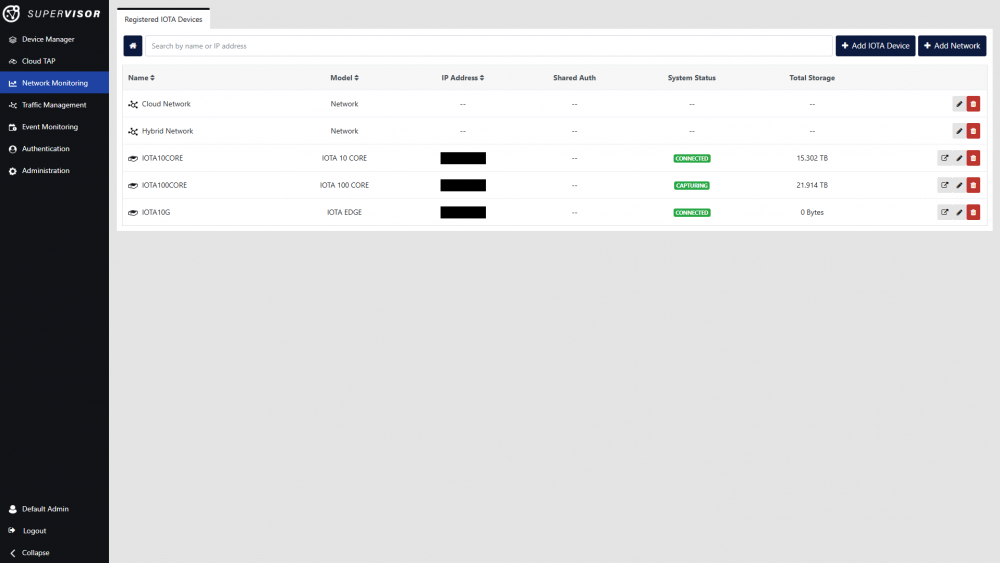
List of registered IOTA devices
From this dashboard, devices and networks can be added, modified, or removed.
Clicking the Open Device  button of a device opens this device's management GUI in a new tab.
To add a new device, click the Add IOTA Device button in the top right corner of the interface, and enter the device's information in the Add IOTA Device window. Enable Shared Authentication if you wish to enable Supervisor's centralized authentication function on this device (see Centralized Authentication). The device's information can be changed at a later time by clicking the device's Edit  button in the list.
Note: Supervisor centralized authentication is not supported with IOTA 100 CORE, however, IOTA 100 CORE features the same authentication facility as Supervisor, allowing for RADIUS/TACACS+/LDAP authentication (see IOTA 100 CORE Authentication).
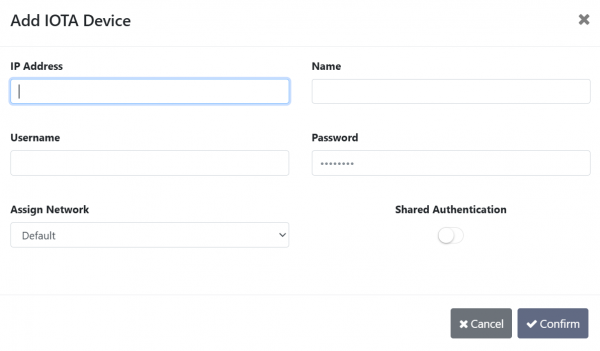
Add IOTA Device window
Note: As of Supervisor v1.2.0, assigning an IOTA device to a network has no effect. Further integration of IOTA in Supervisor will be coming in a future release.