Device recovery CLI
The recovery command-line interface (CLI) can be used to modify the network settings of the management interfaces, and to reboot the device.
Accessing the CLI
The recovery CLI can be accessed by users with administrator privileges (both local users and AAA, see Authentication) either via SSH through the MGMT and MGMT+PTP ports, or via the COM port (serial RS323).
To connect to the device via SSH, perform the following command (where USERNAME is the username and IOTA_IP is the IP address of the device), and submit the password when prompted:
ssh USERNAME@IOTA_IP
For example:

The other way of accessing the CLI is via the COM port. To connect to the serial management interface, use the supplied cable and adapters, and any terminal software, with the following connection settings: 115200 baud rate, 8 bit, no parity, 1 bit stop. Log in using the credentials of a user account with administrator privileges in the appearing shell.
The first method will work if the IOTA device has correctly configured network settings. The second method will always work.
Using the CLI
Once logged in with the appropriate credentials, the CLI prompt appears.
Useful commands to navigate the console:
lsorhelpto list available commands (or by hitting TAB from keyboards).returns to the initial branch..returns to the previous branch
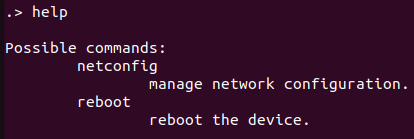
The netconfig command branch is used to configure the network settings of the device’s management interfaces. In the netconfig command branch, the show and update commands are available.
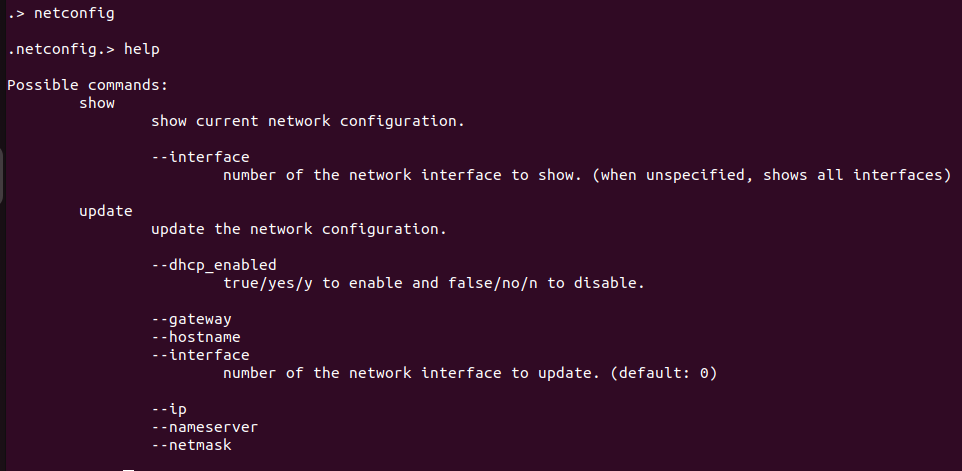
The show command (or .netconfig.show) displays the current configuration of all of the device's management interfaces.
The update command (or .netconfig.update) is used to update the configuration of any of the interfaces. The accepted arguments for the update command can be displayed with the help command (or .netconfig.update.help). For instance, in order to configure the management interface with ID 3 to have a static IP, netmask and gateway, the following command can be executed:

The following interfaces can be configured:
- Management 1: MGMT SFP+ Ethernet 10G
- Management 2: MGMT+PTP RJ45 Ethernet 2.5GBASE-T
The reboot command (or .reboot) reboots the device immediately after confirmation:
