Table of Contents
Authentication
The Authentication page can be accessed via the Authentication menu item by users with Administrator role.
Users
The Users tab allows administrators to add new users or edit existing users and their privilege levels. Depending on the selected role, the user has the following rights:
- administrator: full control, limitless administration and system update;
- user: create and set rules, aggregate and filter traffic, and port configuration;
- viewer: view only: settings, statistics, active rules.
The minimum requirements for the passwords are as follows:
- 8 characters;
- one letter uppercase;
- one letter lowercase;
- one digit.
The Allow External Authentication option allows the user's credentials to be used to log into devices on which Shared Authentication was enabled (see Centralized Authentication section below).
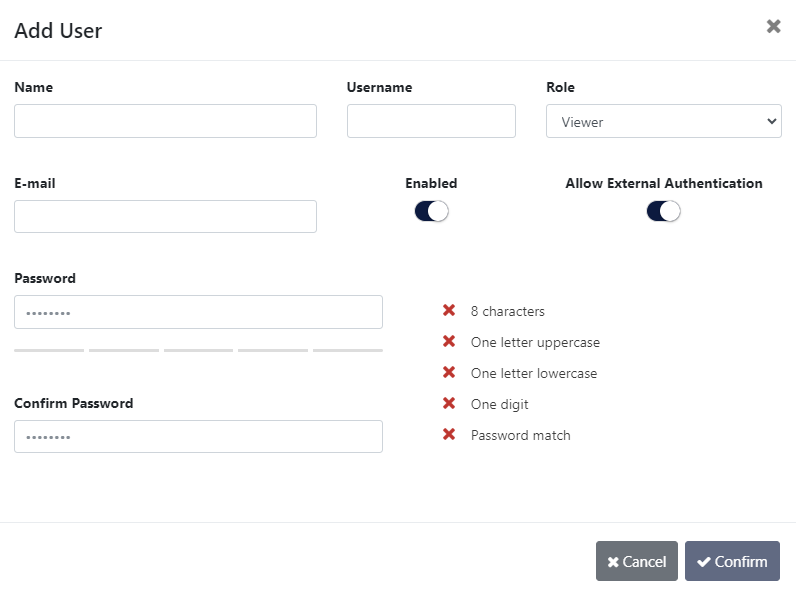
Add User window
TACACS+
The TACACS+ tab allows adding one or more TACACS+ servers, and configuring the following details:
- priority (sets the order in which the servers will be taken into account, if more are added, with a lower number corresponding to a higher priority);
- login type (chap, login, pap);
- server hostname;
- port;
- secret key;
- timeout (waiting time for response from the TACACS+ server, can be set between 1 and 3 seconds);
- privilege mapping (translates the 15 privilege levels from TACACS+ into those of the viewers, users and admins; can be configured).
The Allow External Authentication option allows the user credentials defined on the TACACS+ server to be used to log into devices on which Shared Authentication was enabled (see Centralized Authentication section below).
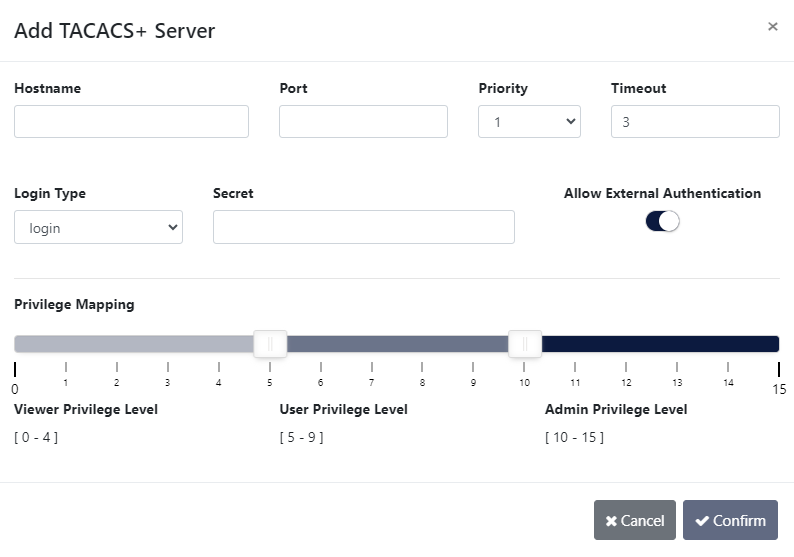
Add TACACS+ Server window
RADIUS
The RADIUS tab allows adding one or more RADIUS servers, and configuring the following details:
- priority (sets the order in which the servers will be taken into account, if more are added, with a lower number corresponding to a higher priority);
- server hostname;
- port;
- secret key;
- timeout (waiting time for response from the RADIUS server, can be set between 1 and 3 seconds);
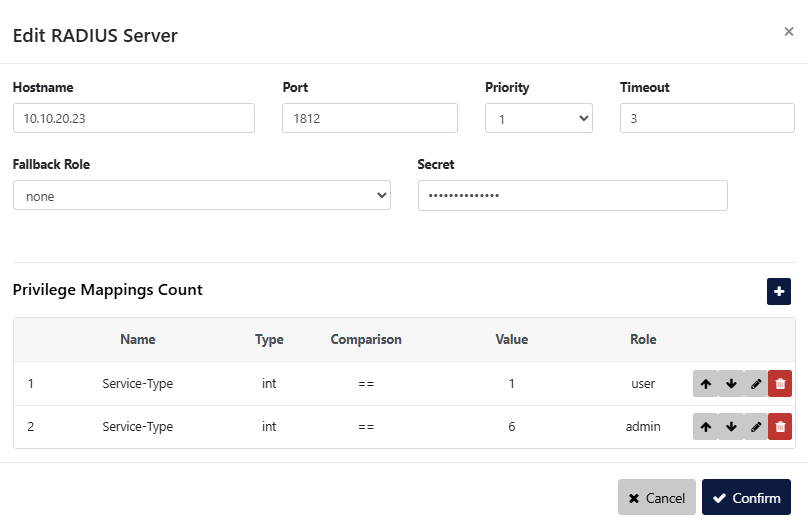
- privilege mappings count (allows adding one or more rules for users. These rules are integer or string type attributes, requiring a name and a value. During authentication, the system checks if a user matches the rules. If there is a match between a user and a rule, then a role is applied for the user);
Note: To add a new rule, click the button. To apply the rule, click the
  button.
 - fallback role (comes into place when there isn’t a match between a user and a rule, with the ‘none’ option denying authentication access to any user).
- With fallback role set to none: If the privilege mapping value is not matched, but the username/password is correct, the login attempt is not accepted.
- With fallback role not set to none: If the privilege mapping value is not matched, but the username/password is correct, the login attempt is accepted.
The Allow External Authentication option allows the user credentials defined on the RADIUS server to be used to log into devices on which Shared Authentication was enabled (see Centralized Authentication section below).
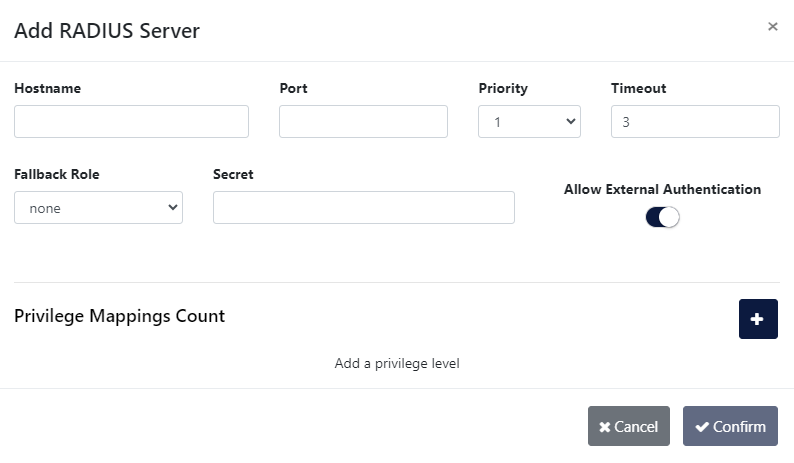
Add RADIUS Server window
RADIUS privilege mapping values must use the data type defined for the corresponding RADIUS attribute. For example, attributes represented as integers/enumerated values, such as Service-Type, must be configured using the int type and their numeric value. Text-based attributes, such as Filter-Id, must be configured using the str type and their text value.
LDAP and LDAPS
The LDAP tab offers the possibility to configure one or more LDAP servers for user authentication. In order to set up the LDAP access, the following settings are required:
- server hostname or address;
- server port: (default 389 for LDAP and 636 for LDAPS);
- priority (sets the order in which the servers will be taken into account, if more are added, with a lower number corresponding to a higher priority);
- timeout (waiting time for response from the LDAP server, can be set between 1 and 3 seconds);
- base DN (base distinguished name): this is the base DN used to query the LDAP servers for its information (example:
ou=people,dc=example,dc=com); - user DN (user distinguished name): DN parameter used to query for the usernames. (example:
uid); - LDAP version: it is possible to configure both LDAP Version 2 and Version 3 servers;
- privilege mappings count (allows adding one or more rules for users. These rules are integer or string type attributes, requiring a name and a value. During authentication, the system checks if a user matches the rules. If there is a match between a user and a rule, then a role is applied for the user);
Note: To add a new rule, click the button. To apply the rule, click the button. - fallback role (comes into place when there isn’t a match between a user and a rule, with the ‘none’ option denying authentication access to any user);
- TLS mode: the user can select whether the server requires TLS (for LDAPS), and if they wish to enforce strict TLS session validation. Note that if this option is set to “strict”, the user will likely need to import a private CA certificate into Supervisor (see Installing a custom CA certificate).
The Allow External Authentication option allows the user credentials defined on the LDAP server to be used to log into devices on which Shared Authentication was enabled (see Centralized Authentication section below).
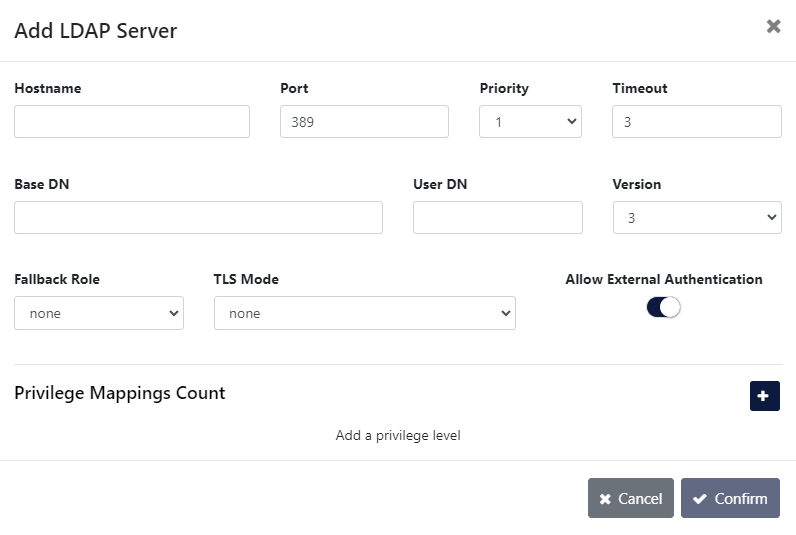
Add LDAP Server window
Custom authentication configuration
Supervisor allows users to not only define multiple authentication methods, but also to configure how the different methods are used by the system. Clicking the Configure Authentication button on either the Users, TACACS+, RADIUS, or LDAP page allows users to see the list of available authentication methods and change their priority and activation strategy.
For each method, one of the following strategies can be selected:
- Enable: The method is activated and will be used to authenticate users;
- Disable: The method is not active and its configuration will be ignored;
- Restrict: A restricted authentication method is activated only if all higher priority methods are failing access. In the case of RADIUS, LDAP, or TACACS+ methods, this means that no server is responding (or no server is programmed). If only one of the registered LDAP/RADIUS/TACACS+ servers replies with a rejection, the following restricted methods will be skipped. Note that “Local Users” are always available, meaning that any “restrict” method after that will never be activated.
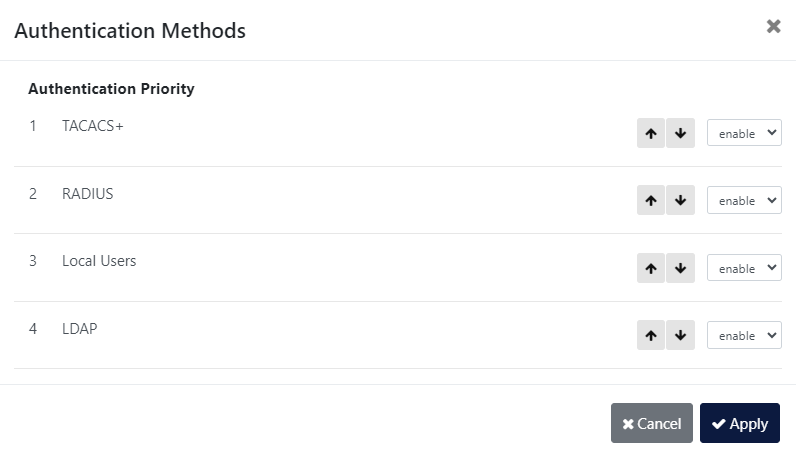
Authentication Methods window
Centralized authentication
Supervisor provides the ability to use credentials defined in the Supervisor itself in order to log into devices it manages. Devices on which Shared Authentication was enabled will be able to use Supervisor credentials, be they Local Users, or users defined on TACACS+, LDAP, or RADIUS servers, on which Allow External Authentication was enabled. The Centralized Authentication follows the Supervisor's Custom Authentication Configuration described above.
The following is an example of how to enable and use the centralized authentication feature. We will create a local user on Supervisor, and use these credentials to log in to a device.
Step 1: Register a device on Supervisor, or edit an existing device, and enable the “Shared Authentication” option.
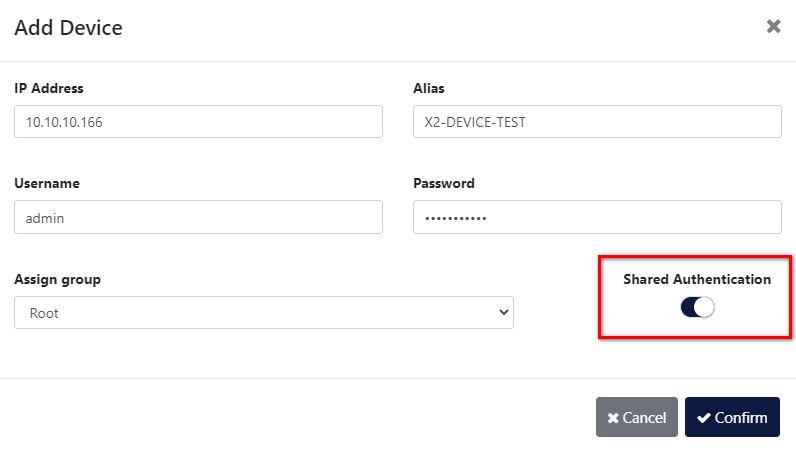
Step 2: Create a local Supervisor user, or edit an existing user, and enable the “Allow External Authentication” option.
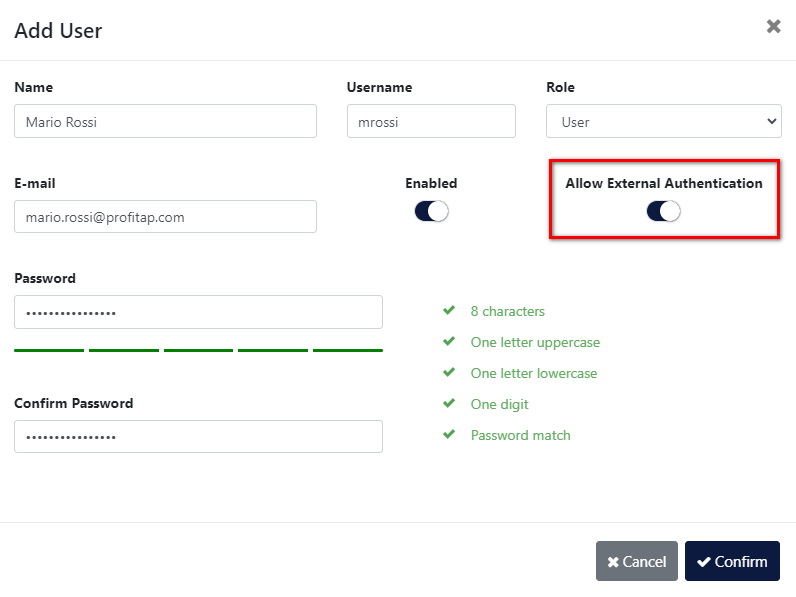
These steps will enable the Supervisor's local user credentials for logging in to the device. The user will have the same privilege levels on both the Supervisor and on the device.
The following are a few examples of possible authentication scenarios.
Scenario 1:
- “Shared Authentication” is enabled on Supervisor for the registered device.
- “Allow External Authentication” is enabled on Supervisor for TACACS+, RADIUS, and Local Users.
- The correct credentials are in the Supervisor's Local Users database.
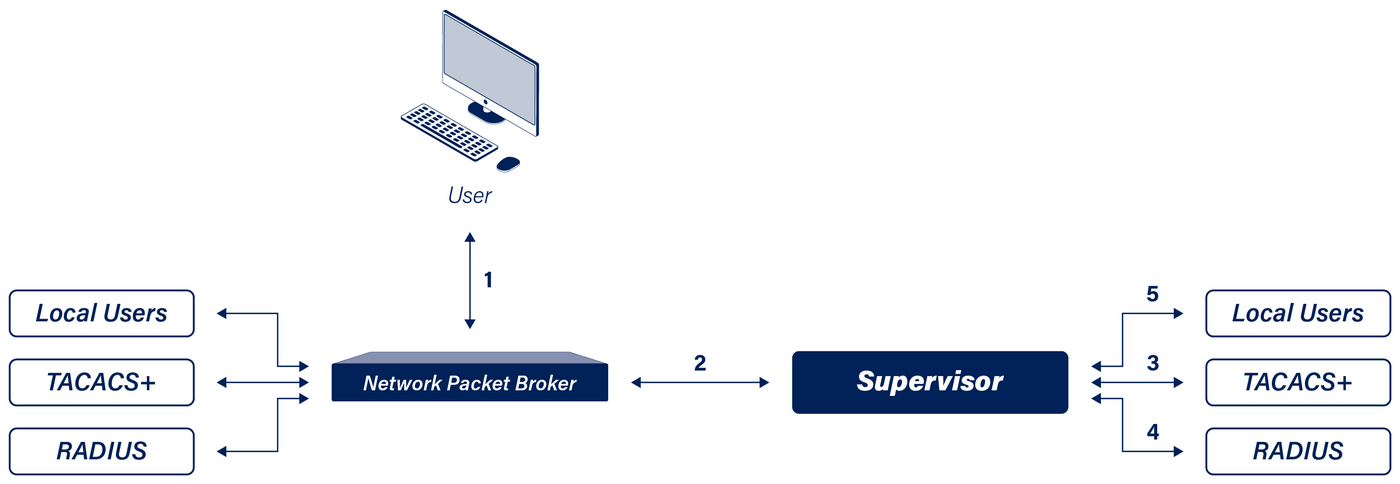
- User initiates a GUI login request to the device. The device checks its authentication priorities. Let's assume “Profitap Supervisor” is the first entry. (For XX-Series, Local Users is always the first priority for GUI access, and Supervisor is the second.)
- The device forwards the request to the Supervisor. Supervisor checks whether “Shared Authentication” is enabled for the device. In this scenario, it is enabled. Supervisor checks its authentication priorities. In this scenario, TACACS+ is the first entry. Supervisor checks whether “Allow External Authentication” is enabled for TACACS+, RADIUS, and Local Users. In this scenario, it is enabled for all of them.
- Supervisor forwards the request to the registered TACACS+ server(s). In this scenario, the credentials are not valid.
- Supervisor forwards the request to the registered RADIUS server(s). In this scenario, the credentials are not valid.
- Supervisor forwards the request to its Local Users database. In this scenario, the credentials are valid. The user can log in to the device.
Scenario 2:
- “Shared Authentication” is enabled on Supervisor for the registered device.
- “Allow External Authentication” is enabled on Supervisor for TACACS+, RADIUS, and Local Users.
- The correct credentials are only in the device's Local Users database.
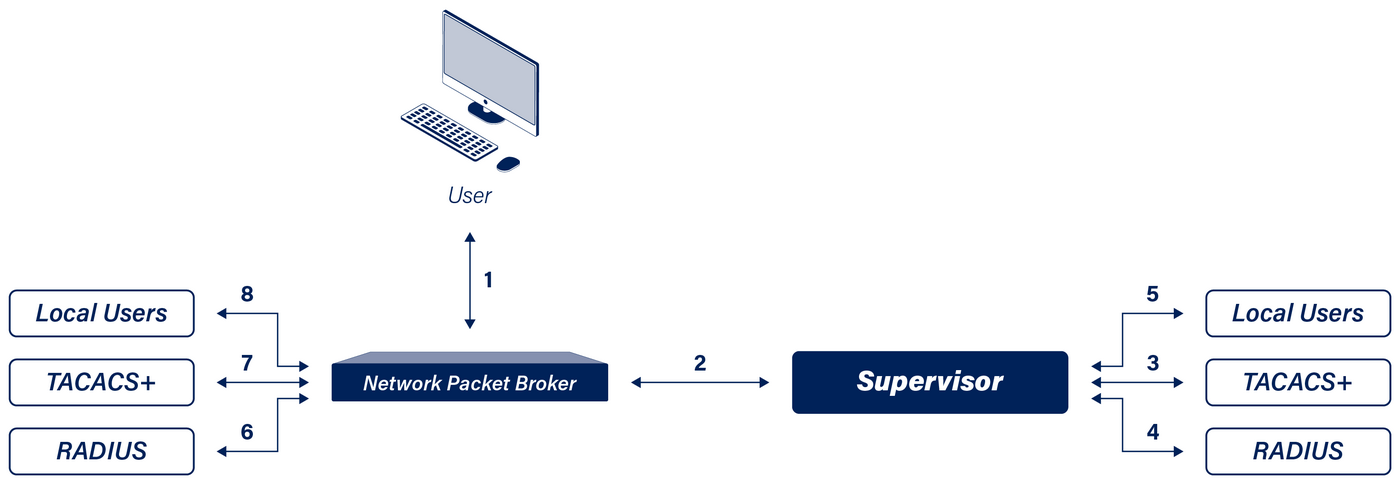
- User initiates a GUI login request to the device. The device checks its authentication priorities. Let's assume “Profitap Supervisor” is the first entry. (For XX-Series, Local Users is always the first priority for GUI access, and Supervisor is the second.)
- The device forwards the request to the Supervisor. Supervisor checks whether “Shared Authentication” is enabled for the device. In this scenario, it is enabled. Supervisor checks its authentication priorities. In this scenario, TACACS+ is the first entry. Supervisor checks whether “Allow External Authentication” is enabled for TACACS+, RADIUS, and Local Users. In this scenario, it is enabled for all of them.
- Supervisor forwards the request to the registered TACACS+ server(s). In this scenario, the credentials are not valid.
- Supervisor forwards the request to the registered RADIUS server(s). In this scenario, the credentials are not valid.
- Supervisor forwards the request to its Local Users database. In this scenario, the credentials are not valid.
- The device forwards the request to the registered RADIUS server(s), assuming that RADIUS is second in the priority order. In this scenario, the credentials are not valid.
- The device forwards the request to the registered TACACS+ server(s), assuming that TACACS+ is third in the priority order. In this scenario, the credentials are not valid.
- The device forwards the request to its Local Users database, assuming that Local Users is fourth in the priority order. In this scenario, the credentials are valid. The user can log in to the device.
Scenario 3:
- “Shared Authentication” is enabled on Supervisor for the registered device.
- “Allow External Authentication” is disabled on Supervisor for TACACS+, and enabled for RADIUS and for Local Users.
- The correct credentials are on the RADIUS server registered on Supervisor.
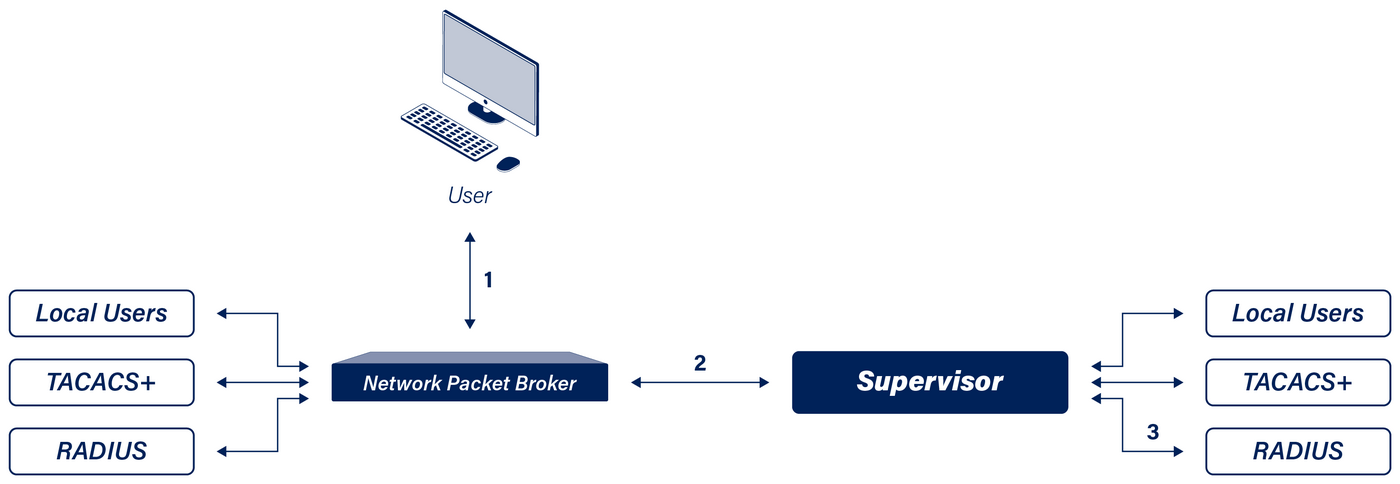
- User initiates a GUI login request to the device. The device checks its authentication priorities. Let's assume “Profitap Supervisor” is the first entry. (For XX-Series, Local Users is always the first priority for GUI access, and Supervisor is the second.)
- The device forwards the request to the Supervisor. Supervisor checks whether “Shared Authentication” is enabled for the device. In this scenario, it is enabled. Supervisor checks its authentication priorities. In this scenario, TACACS+ is the first entry, RADIUS second, and Local Users third. Supervisor checks whether “Allow External Authentication” is enabled for TACACS+, RADIUS, and Local Users. In this scenario, it is disabled for TACACS+, and enabled for RADIUS and for Local Users.
- Supervisor skips TACACS+ and forwards the request to the RADIUS server. In this scenario, the credentials are valid. The user can log in to the device.