Table of Contents
Authentication
The Authentication page can be accessed via the Authentication menu item by users with Administrator role.
Local Users
The Local Users tab allows administrators to add new users or edit existing users and their privilege levels. Depending on the selected role, the user has the following rights:
- administrator: full control, limitless administration and system update;
- user: create and set rules, aggregate and filter traffic, and port configuration;
- viewer: view only: settings, statistics, active rules.
The minimum requirements for the passwords are as follows:
- 8 characters;
- one letter uppercase;
- one letter lowercase;
- one digit.
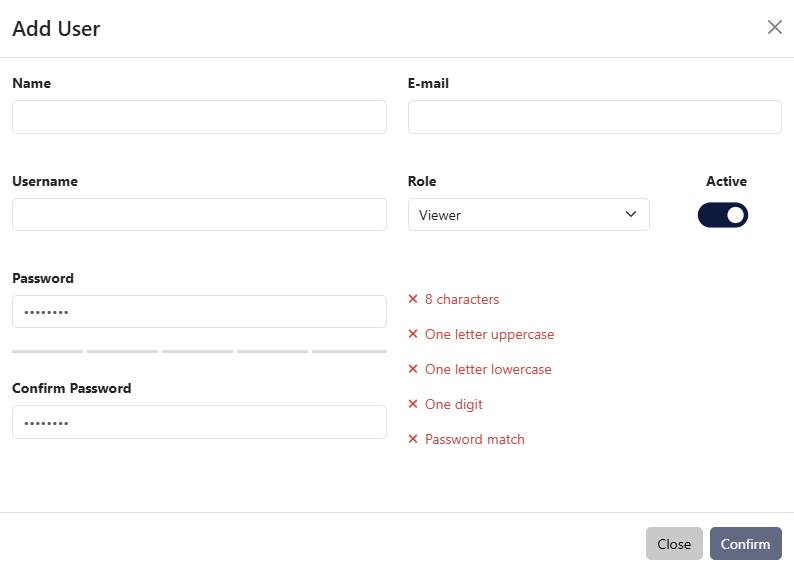
Add User window
TACACS+
The TACACS+ tab allows adding one or more TACACS+ servers, and configuring the following details:
- priority (sets the order in which the servers will be taken into account, if more are added, with a lower number corresponding to a higher priority);
- login type (chap, login, pap);
- server hostname;
- port;
- secret key;
- timeout (waiting time for response from the TACACS+ server, can be set between 1 and 3 seconds);
- privilege mapping (translates the 15 privilege levels from TACACS+ into those of the viewers, users and admins; can be configured).
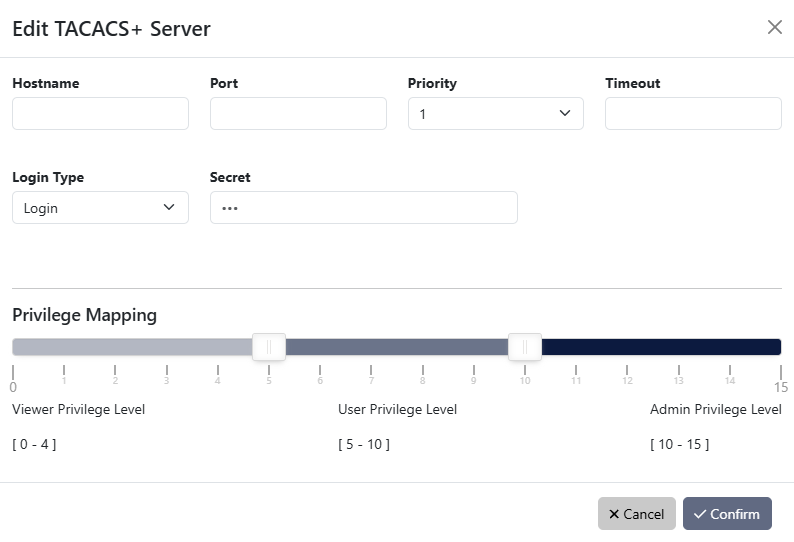
Add TACACS+ Server window
RADIUS
The RADIUS tab allows adding one or more RADIUS servers, and configuring the following details:
- priority (sets the order in which the servers will be taken into account, if more are added, with a lower number corresponding to a higher priority);
- server hostname;
- port;
- secret key;
- timeout (waiting time for response from the RADIUS server, can be set between 1 and 3 seconds);
- privilege mappings count (allows adding one or more rules for users. These rules are integer or string type attributes, requiring a name and a value. During authentication, the system checks if a user matches the rules. If there is a match between a user and a rule, then a role is applied for the user);
Note: To add a new rule, click the button. To apply the rule, click the
  button.
 - fallback role (comes into place when there isn’t a match between a user and a rule, with the ‘none’ option denying authentication access to any user).
- With fallback role set to none: If the privilege mapping value is not matched, but the username/password is correct, the login attempt is not accepted.
- With fallback role not set to none: If the privilege mapping value is not matched, but the username/password is correct, the login attempt is accepted.
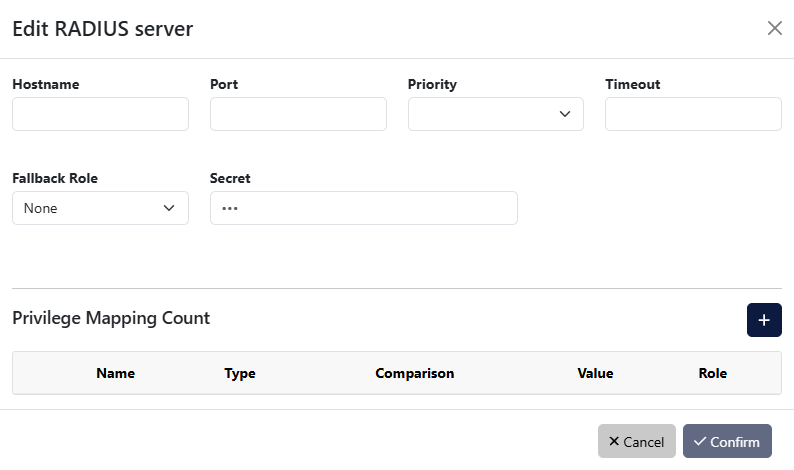
Add RADIUS Server window
RADIUS privilege mapping values must use the data type defined for the corresponding RADIUS attribute. For example, attributes represented as integers/enumerated values, such as Service-Type, must be configured using the int type and their numeric value. Text-based attributes, such as Filter-Id, must be configured using the str type and their text value.
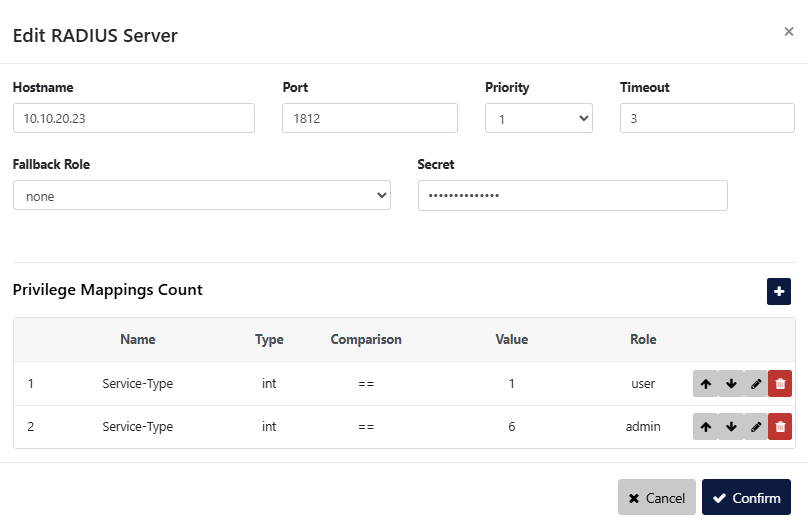
LDAP and LDAPS
The LDAP tab offers the possibility to configure one or more LDAP servers for user authentication. In order to set up the LDAP access, the following settings are required:
- server hostname or address;
- server port: (default 389 for LDAP and 636 for LDAPS);
- priority (sets the order in which the servers will be taken into account, if more are added, with a lower number corresponding to a higher priority);
- timeout (waiting time for response from the LDAP server, can be set between 1 and 3 seconds);
- base DN (base distinguished name): this is the base DN used to query the LDAP servers for its information (example:
ou=people,dc=example,dc=com); - user DN (user distinguished name): DN parameter used to query for the usernames. (example:
uid); - LDAP version: it is possible to configure both LDAP Version 2 and Version 3 servers;
- privilege mappings count (allows adding one or more rules for users. These rules are integer or string type attributes, requiring a name and a value. During authentication, the system checks if a user matches the rules. If there is a match between a user and a rule, then a role is applied for the user);
Note: To add a new rule, click the button. To apply the rule, click the button. - fallback role (comes into place when there isn’t a match between a user and a rule, with the ‘none’ option denying authentication access to any user);
- TLS mode: the user can select whether the server requires TLS (for LDAPS), and if they wish to enforce strict TLS session validation. Note that if this option is set to “strict”, the user will likely need to import a private CA certificate into IOTA (Administration > Setup GUI page).
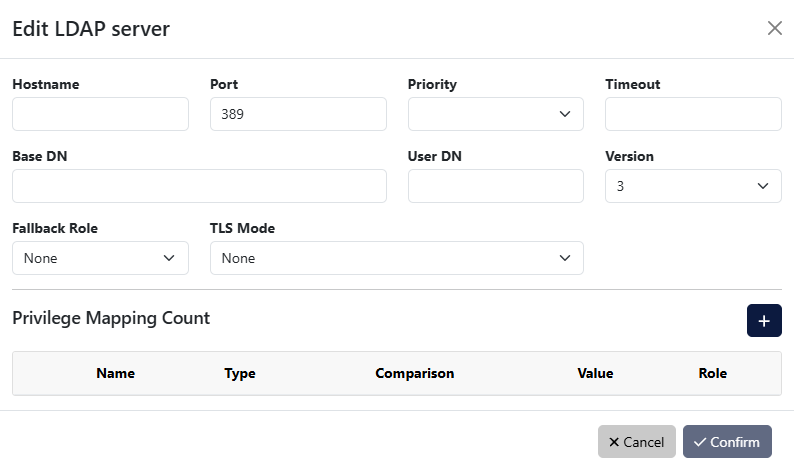
Add LDAP Server window
Custom authentication configuration
IOTA allows users to not only define multiple authentication methods, but also to configure how the different methods are used by the system. Clicking the Configure Authentication button on either the Users, TACACS+, RADIUS, or LDAP page allows users to see the list of available authentication methods and change their priority and activation strategy.
For each method, one of the following strategies can be selected:
- Enable: The method is activated and will be used to authenticate users;
- Disable: The method is not active and its configuration will be ignored;
- Restrict: A restricted authentication method is activated only if all higher priority methods are failing access. In the case of RADIUS, LDAP, or TACACS+ methods, this means that no server is responding (or no server is programmed). If only one of the registered LDAP/RADIUS/TACACS+ servers replies with a rejection, the following restricted methods will be skipped. Note that “Local Users” are always available, meaning that any “restrict” method after that will never be activated.
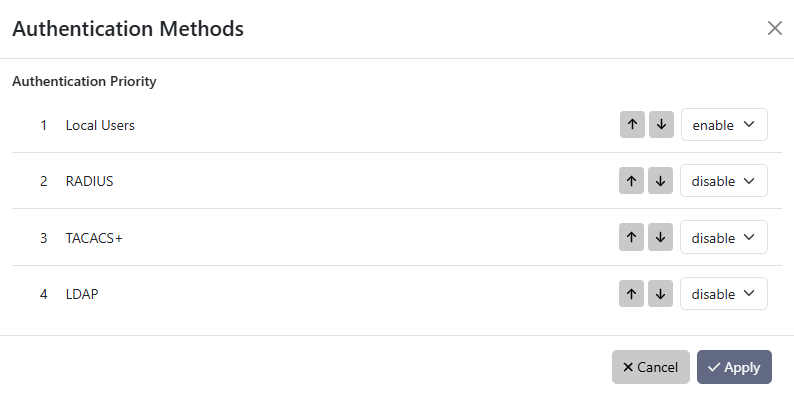
Authentication Methods window