Table of Contents
IOTA 1G interfaces and LED behavior
Note: This article is deprecated. For the up-to-date versions of this article, see kb.profitap.com/iota/
Interfaces
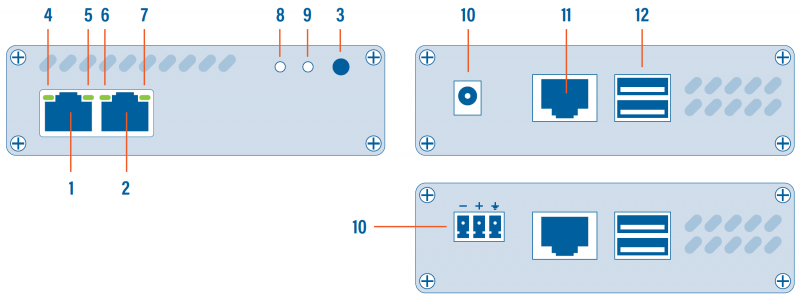
| 1, 2 | RJ45 Ethernet port A and B |
|---|---|
| 3 | START/STOP/RESET button |
| 4, 5, 6, 7 | Network status and activity LEDs |
| 8 | Status LED |
| 9 | Capture LED |
| 10 | 12 VDC power input (12V model) |
| 10 | 24-48 VDC power input (24V model) |
| 11 | RJ45 Management port |
| 12 | 2 x USB 3.0 port type A |
LED behavior
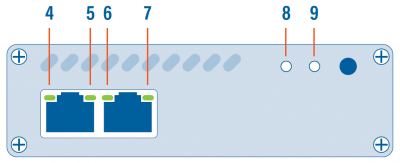
| LED state | Meaning |
|---|---|
| 4 and/or 7 steady green | The port is linked. |
| 4 and/or 7 blinking green | The port is linked and has RX/TX activity (traffic is passing through). |
| 5 steady green 6 off | Capture interface operating at 10 Mbps speed. |
| 5 blinking green 6 off | Capture interface is initializing. |
| 5 off 6 steady green | Capture interface operating at 100 Mbps speed. |
| 5 off 6 blinking green | Capture interface firmware is corrupted. |
| 5+6 steady green | Capture interface operating at 1 Gbps speed. |
| 5+6 blinking green | The port is linked and has RX/TX activity (traffic is passing through). |
| 5+6 alternating blinking | Capture interface cannot find a common speed between the connected devices. |
| 8 blinking orange 9 off | Booting |
| 8 green 9 green | Running |
| 8 green 9 blinking green | Capturing |
| 8 blinking orange and green 9 blinking orange and green | Updating |
| 8 blinking red 9 blinking red | Hardware failure |
| 8 blinking orange 9 blinking orange | Factory reset |
| 8 blinking green 9 off | Shutting down |
| 8 off 9 off | Shutdown completed |